The Neighborhood Page Architecture for a Real Estate Agent Website
How to structure a real estate agent website around the areas you serve, with one page per area, linked to your listings and articles.
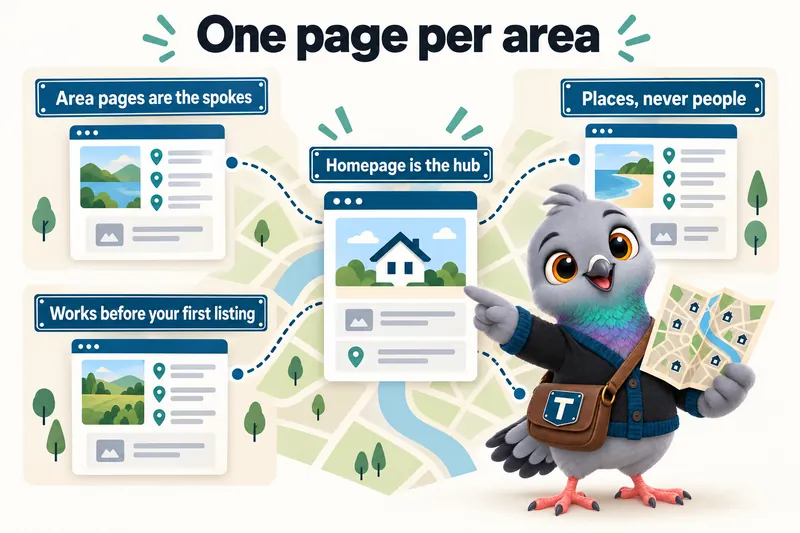
A real estate agent website ranks for a specific area when it has a specific, structured page for that area, not when it mentions the area once in a paragraph about the agent’s general service territory. This is the neighborhood page architecture: a homepage that acts as a hub, linked out to one dedicated page per area an agent actually serves, with each of those pages linked onward to the listings placed there and any article written about it. It is a simple shape, and most agent websites do not use it.
What “neighborhood page architecture” actually means
Most agent websites treat their service area as a single fact to be stated once, usually in a paragraph near the footer: “proudly serving Springfield, Millbrook and the surrounding communities.” That sentence tells a human reader something true, and it tells a search engine almost nothing useful. A search engine trying to answer “homes for sale in Millbrook” is looking for a page about Millbrook, not a paragraph that happens to contain the word once among several others.
The neighborhood page architecture solves this by giving every area a page of its own. The site’s homepage becomes a hub: it introduces the agent and links out to each area page. Each area page becomes a spoke: it describes that specific place, and links onward to the listings currently placed there and to any article written about it. A visitor, and a search engine, can move from the general to the specific in one click, and from the specific back to related specifics in another.
The problem with a single service-area paragraph
A paragraph that names several towns has three structural weaknesses. First, it cannot rank distinctly for each town, because a page can only be one page, and Google’s own guidance on page structure and content treats a page as being about what it is substantively built around, not every word it happens to contain. Second, it cannot carry area-specific detail, housing stock, common lot sizes, proximity to specific amenities, without becoming an unreadable list. Third, it gives an agent nowhere to put an area-specific listing or article, so those end up either scattered with no home page to belong to, or crammed into the same paragraph until it collapses under its own length.
The hub-and-spoke shape
The alternative is a hub-and-spoke structure, and it scales cleanly whether an agent covers three towns or thirty. The hub is a single index page, often the home page itself or a dedicated “areas we serve” page, listing every area with a link to its own page. Each spoke, the area page itself, is built to the same consistent structure every time: what the area is, in geographic and practical terms, what kind of housing is typically found there, and what is nearby that a buyer would reasonably want to know about. From there, the page links to the listings placed in that area and to any article written specifically about it.
This shape is also what makes the site maintainable. Adding a new area later means adding one new spoke and one new link from the hub, not rewriting a paragraph that already strains to hold the areas it lists.
Why a page per area helps search visibility
What a dedicated page can do that a mention cannot
A page dedicated to one area can carry a title, a heading and body content that are specifically about that area, which is the basic unit search engines work with when trying to match a query to a page. That specificity is what a shared paragraph structurally cannot provide, no matter how well it is written. This does not mean a page is guaranteed to rank; it means the page has the structural precondition to be matched at all, which a paragraph mentioning the area in passing does not have.
The area page also becomes a natural place to accumulate genuinely new content over time: an article written specifically about that area, an updated description as housing stock in the area shifts, and a running list of the listings an agent has placed there. That accumulation of specific, current content is one of the more durable ways a smaller site competes for relevance against a directory or portal with far more raw pages but none of them built around an individual agent’s own service, which is the whole difference between a small business’s website and a listing aggregator.
Where page speed fits into the structure
Structure and speed are not separate concerns on a real estate site, because the pages doing the structural work, the area pages and listing pages, are usually also the pages carrying the most photography. Core Web Vitals, the set of metrics Google uses to assess a page’s loading performance, responsiveness and visual stability, are documented in detail on web.dev, and they apply to an area page exactly the same way they apply to a homepage. An area page that loads slowly because of unoptimized photography undermines the very structure it was built to provide, since a visitor who leaves before the page finishes loading never sees the content that page was supposed to rank for. This is part of why a real estate site’s technical build, not just its written content, is inseparable from its area page strategy; see the features page for how page speed and area page structure are built together rather than as separate add-ons.
What belongs on an area page
Geography and housing type, not characterisations of residents
An area page should describe a place, not the people in it. That means geography, general housing stock (single-family homes, condos, new construction, acreage, whatever is actually typical there), proximity to amenities a buyer would reasonably care about, and practical context such as commute routes. It should not include characterisations of who lives in an area or who an area is “right for,” phrased in terms connected to protected characteristics such as race, religion, family status or national origin. The Fair Housing Act, summarised in HUD’s own overview of the law, exists precisely to prevent steering language, language that suggests a place is or is not suitable for someone based on those characteristics, and real estate marketing has historically been an area where this kind of language showed up carelessly. The safest and, frankly, the better-written approach is to describe the place in factual terms and let a buyer draw their own conclusions about fit.
This is a rule an agent’s whole team should internalise, not just a line item on a website brief. It shapes how an audience page for a specific specialty can talk about comparing areas for someone moving from out of town: the comparison lives in the facts (housing type, geography, commute), not in characterisations of the people already there.
Linking outward to listings and articles
An area page earns its keep by connecting to the content that actually belongs to it. When a new listing is placed in an area, it should appear on that area’s page, not only in a general listings feed. When an article is written about buying in that area, it should link back to the area page and be linked from it. This is what turns a set of static area pages into a living structure instead of a set of pages that were built once and never touched again.
Structuring the hub page
The homepage as the index
The homepage does not need to describe every area in detail; that is what the area pages are for. Its job is to introduce the agent, state the plans and areas served in general terms, and link clearly to every area page, ideally through both a visible section on the page and a persistent navigation element such as a mega menu. A visitor should never have to guess that an area page exists; the hub should make every spoke discoverable in one or two clicks from anywhere on the site.
Navigation patterns that support the structure
A mega menu grouped by area type, or a dedicated “areas we serve” index page linked from the main navigation, both work, and the right choice depends on how many areas an agent covers. A team covering three or four towns can list them directly in the navigation. A team covering a dozen or more areas usually benefits from a dedicated index page, so the navigation itself stays usable rather than becoming a long scrolling list. Either way, the principle is the same: every area page should be reachable from the main navigation, not buried three clicks deep or reachable only through search.
Breadcrumbs and the trail back to the hub
A visitor who lands on an area page from a search result rarely arrives through the homepage first, so the page itself needs to make the rest of the site’s structure obvious without requiring a click back to the navigation. A simple breadcrumb trail, home, then areas served, then the specific area, does this cheaply: it tells a visitor where they are, gives them a one-click path back to the full list of areas, and gives a search engine an explicit statement of how the page fits into the site’s hierarchy. It is a small piece of the architecture, but it is the piece most often left out when a site is built area page by area page rather than planned as a structure from the start.
Listing pages and how they connect to area pages
A listing page and an area page are not the same thing and should not be merged. A listing page describes one specific property currently for sale: price, bedrooms, bathrooms, square footage, lot details and the listing description. An area page describes the place itself, and stays relevant even as individual listings come and go. The connection between them is a link, not a merge: a listing page names the area it belongs to and links to that area’s page, and the area page lists the listings currently placed within it. When a listing sells, it can move to a sold listings section rather than disappearing, which keeps a visible track record without cluttering the active listings shown on the area page. Solo agents building their personal listing history benefit from this separation especially clearly, since it is what lets a site show both an active pipeline and a track record without the two competing for the same page.
Schema and structured data for area and listing pages
Structured data, the markup that tells a search engine explicitly what kind of thing a page represents, matters more on a real estate site than on a typical small business site because a real estate site has several genuinely different page types living side by side: a service page, a set of area pages, a set of listing pages, and a blog. Google’s own general guidelines on structured data describe the practice of marking up a page’s content in a way that matches what the page is actually about, and applying the correct type consistently across a site is what allows search engines and other systems reading the page to understand it as the specific kind of content it is, rather than treating every page on the site identically. An area page, a listing page and an article are three different kinds of content, and treating them identically in markup wastes the distinction the architecture was built to create in the first place.
Sitemaps and discoverability
None of this structure matters if new pages are not discoverable. A sitemap, an XML file listing a site’s pages for search engines to crawl, should be generated automatically as new area pages, listing pages and articles are added, rather than maintained by hand. Google’s documentation on sitemaps describes them as a way to communicate site structure to a crawler, particularly useful when a site has pages that might not otherwise be discovered through normal link crawling in a timely way, which is exactly the situation with a new listing that needs to be found quickly. An automatically regenerated sitemap means a new area page or a new listing is discoverable the moment it is published, rather than sitting unindexed until the next general crawl happens to reach it.
A simple framework to plan your own area pages
Step one: list every area you actually serve
Write down every town, city, county or district you genuinely work in, not an aspirational list of everywhere you would like to sell someday. A page about an area with no real activity or knowledge behind it tends to read thin, and a thin page does the architecture no favours.
Step two: decide what belongs on each page
For each area, note the geography, the general housing types found there, and two or three amenities or landmarks a buyer would reasonably want to know about. Keep the tone factual throughout, describing the place rather than the people in it.
Step three: connect areas to listings and content
As listings come in, tag each one to its area page. As articles are written, link them to the areas they discuss. This is the step that turns a static set of pages into a genuinely connected structure, and it is also the step most agent websites skip, which is why so many sites have an “areas we serve” page that reads like it was written once, years ago, and never touched again.
Step four: keep it current
An area’s housing stock and amenities do change, if slowly, and an area page should be revisited occasionally rather than treated as permanent copy. This does not need to be frequent; it needs to happen at all.
Common mistakes to avoid
The most common mistake is writing one area page as a template and copying it with the town name swapped, which produces pages that are technically distinct but substantively identical, and search engines and readers both notice the pattern quickly. The second most common mistake is building area pages once at launch and never linking new listings or articles back to them, which lets the architecture decay into a set of orphaned pages within a year. The third is drifting into characterising the people in an area rather than the area itself, which is both a fair housing risk and, separately, simply worse writing than describing the place on its own terms.
Where this fits into the rest of the site
The neighborhood page architecture is not a standalone feature; it is the backbone the rest of a real estate agent site is organized around, from the pricing structure, which builds area pages and listing pages into every plan, to the way a small team’s site routes inquiries by area to the right agent. If you want to see this structure built for your own market, with your own areas and your own listings in place rather than as an abstract description, a live demo walks through exactly that in about thirty minutes.
Sources
Frequently asked questions
How many area pages should a real estate agent website have?
One for every area you genuinely serve and can write real, factual content about. A site that lists thirty towns with a sentence each is thinner than a site with six towns described properly, and thin pages tend to sit quietly unindexed rather than rank.
What is the difference between an area page and a listing page?
An area page describes a town, city or region: its geography, housing types and amenities. A listing page describes one specific property for sale. An area page links out to the listing pages placed within it, but the two serve different searches and should not be merged into one page.
Is it a fair housing problem to write about neighborhoods?
It becomes a problem when the copy characterises the people who live somewhere rather than the place itself. Describing geography, housing stock and amenities in factual terms is standard practice; describing who a neighborhood is or is not suited for, in terms connected to protected characteristics, is not.
Does adding more area pages guarantee better rankings?
No page count guarantees a ranking outcome. What a dedicated, well-linked area page does is give a search engine a specific, structured page to match against a specific area search, which a single paragraph mentioning several towns cannot do.
Can a new agent with no listings yet build area pages?
Yes. Area pages describe the area itself, not your listings, so they can be built and published before your first sale on a new site. Listings and articles are then linked in as they arrive.
Want a site built the way this article describes?
A live walk-through of the site you would get, on your screen, in about 30 minutes. Book a demo with GetRealtorWebsite.