Features
Every feature of your agent website, and the plan it comes with.
Every feature of a GetRealtorWebsite website for real estate agents and small teams, and which of the three plans carries it.
Pages built for an instant open
Custom-coded pages served from the edge, 90+ Google PageSpeed on every page, on every plan.
Why speed is the first feature, not a bonus
A listing page that opens instantly keeps the visitor who found it from a search or a text link and was one slow load away from leaving. Every page is custom coded, ships almost no client-side JavaScript, and is served from a global edge network, so the site scores 90+ on Google PageSpeed on the day it launches rather than after someone eventually audits it. On a phone at an open house, in a car between showings, that difference is the whole interaction.
What actually makes a real estate site slow
Most agent sites carry the weight of a page builder or a plugin-based listing widget: large uncompressed photography, third-party embeds that block rendering, and scripts nobody remembers adding. We build the layout, the image handling and the listing display as one coded system, so a photo-heavy listing page still loads fast instead of asking a buyer to wait on a spinner before they see the kitchen.
How a faster page can make paid ads cheaper
If you run Google Ads or social ads to a listing or an area page, you pay for the click whether or not the page loads. A page that opens quickly keeps more of those paid clicks, so fewer people leave before they see anything. Google also says landing page experience is part of how it judges ad quality, and that higher-quality ads can often lead to lower costs per click. A fast, relevant page helps with both. We do not promise a specific cost-per-click drop, because your bids, keywords and competition decide that too.
- What it solves
- A buyer taps your listing link at a red light and leaves before the photos load.
- What you do
- Nothing. Speed is built in and held for the life of the plan.
- Included on
- Every plan
A site structured around the areas you serve
One page per area you actually work, connected to the listings and articles that belong there.
Why a single "service area" line is not enough
A site that mentions the areas you cover in one paragraph gives a search engine nothing to rank and gives a buyer nothing to click. We build a dedicated page for each area you name during onboarding, structured the same way every time: what the area is known for in practical terms, the kind of housing stock typically found there, and the listings and articles that belong to it. These are location pages for your own market, and they are how a small operation competes against a national portal for a search tied to a specific town.
How the pages connect to each other
Each area page links to the listings placed in it, to the articles written about it, and back to a central hub page that lists every area you serve. That hub-and-spoke shape is set up during onboarding from the list of towns, cities or ZIP codes you give us, and a new area is added later as an ordinary revision.
What we do not do
We do not write copy that characterizes the people who live in an area, and we do not offer opinions on where someone should or should not buy. Area pages describe geography, housing type and amenities in factual terms. That keeps the pages useful for search and written with fair housing rules in mind.
- What it solves
- A search for the towns you farm finds a national portal, not you.
- What you do
- List the towns, neighborhoods or ZIP codes you serve on the onboarding form.
- Included on
- Every plan
Listing pages that read like a real estate site, not a template
A dedicated page for each active listing, with a layout built for photography and specifics.
One page per listing, built to be shared
Every active listing gets its own page with a URL you can text, post or hand to a cooperating agent: a photo layout that gives the images room, the specifics laid out plainly, and a direct path to request a showing or ask a question. The page lives on your site and in your name, and it moves to a sold page afterward rather than disappearing.
What goes on a listing page and what does not
The page carries the facts you give us: price, bedrooms and bathrooms, square footage, lot details and the listing description you write. We do not add valuation estimates, comparable-sale opinions or investment framing anywhere on the page. There is no automatic feed from your brokerage system, so a new listing is added through a revision request, usually within the standard turnaround.
- What it solves
- Your listings live only on a portal or brokerage system and vanish from your own site once they close.
- What you do
- Send photos and specifics through your client portal. We build the page.
- Included on
- Every plan

Inquiries routed straight into your CRM
Showing requests and contact forms land where you already work, by API, Zapier or Make.
Where an inquiry goes the moment it is submitted
A showing request or a contact form on your site is connected to your CRM by direct API, Zapier or Make, so a name and phone number lands where you or your team already work rather than in an inbox nobody checks between showings. You tell us the tool during onboarding and we build the connection before launch.
Forms built for how people actually reach out
A showing request form asks for the listing, a preferred time and a contact method, nothing more. A general contact form asks what someone is trying to do, buy, sell or ask a question, so the message that reaches you already tells you which conversation to have. On a team site, the form can route to the right agent rather than a shared inbox.
- What it solves
- Showing requests sit in an inbox nobody checks between appointments.
- What you do
- Tell us which CRM or calendar you use. We build and test the connection before launch.
- Included on
- Every plan
The AI Engine: chat on your site
A trained chat agent on your site that answers common questions and books a showing while you are with a client.
What the chat actually does
On The Territory and The Portfolio, a chat widget on your site is run by a trained agent that answers common visitor questions, such as a listing's specifics, your service areas or how to book a showing, and hands off to a real showing request or an appointment the moment someone is ready to move forward. It is configured never to give valuation, investment or legal advice, and to hand any question that sounds like advice straight to you.
Training and usage
We train it on your listings, your service areas and the FAQ you approve during onboarding, and you review the answers before it goes live. Usage is billed at what our provider charges us, with no markup, and shown separately from the flat monthly fee so you can see exactly what it costs to run.
- What it solves
- A buyer with a quick question at 9pm gets no answer and moves on to the next agent.
- What you do
- Approve the answers and the handoff rules before it goes live.
- Included on
- The Territory, The Portfolio
An AI receptionist for the calls you cannot take
Answers your business line when you are in a showing, takes the details, books the appointment and sends you a summary.
What happens when you cannot pick up
On The Territory and The Portfolio, an AI receptionist answers the calls you miss. It greets the caller in your business's name, answers common questions about your listings and your areas, takes the caller's details and what they want, and books a showing or a call back into your calendar. You get a call summary and transcript so you know who called and why before you ring back.
What it will not do
It is configured not to give professional advice: no pricing opinions, no valuation, nothing about a buyer's finances or a contract. Anything like that is handed to you. You review the script before launch, and you can change what it says through a revision like any other change.
- What it solves
- Your phone rings during a showing or a closing, and the caller rings the next agent on the list.
- What you do
- Approve the script and tell us when calls should go to you instead.
- Included on
- The Territory, The Portfolio
AI replies on SMS, Facebook Messenger and Instagram DMs
Answers text messages and social DMs in minutes and books appointments, with the SMS registration filed for you.
Where the messages come from
Buyers and sellers message an agent wherever they found them: a text to your number, a Facebook Messenger message from a listing post, an Instagram DM from a reel. On The Territory and The Portfolio, the same trained agent that runs your site chat answers those messages, qualifies the person and books an appointment, then hands the conversation to you.
Text messaging needs A2P 10DLC registration. We file it.
Business texting in the US runs through carrier registration known as A2P 10DLC. We file that registration for you as part of setup. Carrier fees are passed through at cost. Your forms carry opt-in consent wording that matches the registration, and you stay responsible for consent, opt-out and record-keeping for your own messages, as the terms set out.
- What it solves
- A message about a listing sits unanswered for hours on Instagram, and the lead goes cold.
- What you do
- Connect your Facebook and Instagram accounts once, and approve the replies.
- Included on
- The Territory, The Portfolio
Researched articles, published every week
2 researched, cited articles a week on The Listing and The Territory, 3 on The Portfolio, each 2,500 to 3,200 words.
What gets written and why it is not advice
Every plan publishes researched, cited articles every week: buying-process explainers, factual area guides and general market context, each 2,500 to 3,200 words, sourced from reputable outlets rather than invented. They are general information for a reader considering the areas you serve, never a specific recommendation about a property or a transaction, and every figure links back to where it came from.
How the articles connect to your area pages
Every article links back to the area page and the listing pages it relates to, so the content builds authority for the pages that actually generate an inquiry rather than sitting in a blog nobody links to. Drafts are visible in your client portal, and a change to an article is requested like any other revision.
- What it solves
- Your blog has not been touched since the site launched, and there is no time to write.
- What you do
- Nothing, unless you want to review drafts in your portal before they publish.
- Included on
- Every plan
The Content Engine
A third article every week, 3 social posts and 2 reels a week, and your Google Business Profile kept current.
What the Content Engine adds on The Portfolio
The Portfolio raises articles to 3 a week and adds the content most agents never get to: 3 social posts and 2 short video reels a week, and a managed Google Business Profile. Each piece points back to a listing, an area page or an article on your site, so the attention it earns lands somewhere that can turn into an inquiry.
Why it runs from the website outward
Posts and reels are cut from what is already on your site: a new listing, an area guide, a sold page. That keeps your social presence consistent with your site, keeps the facts matching, and means nothing is published that you have not already approved in some form.
- What it solves
- You know you should post every week, and every week the listings win.
- What you do
- Approve the calendar once, then send the occasional photo or listing update.
- Included on
- The Portfolio
A managed Google Business Profile
Your Google Business Profile kept current with posts, photos and correct details, on The Portfolio.
Why the profile matters for an agent
For a search like "realtor near me" or an agent's name, the Business Profile is often the first thing a person sees, before your website. On The Portfolio we keep it current: correct name, website link, service areas and hours, new photos, and regular posts that point to your listings and area pages.
What we will not do with it
We follow Google's guidelines for representing a business. We do not write or solicit fake reviews, we do not stuff keywords into your business name, and you remain the profile owner throughout.
- What it solves
- Your Google Business Profile still shows an old brokerage, an old photo and no recent posts.
- What you do
- Give us manager access to the profile. You stay the owner.
- Included on
- The Portfolio
SEO, answer engines and AI assistants, built into every page
Technical and on-page SEO, answer-first content, schema, sitemaps and an llms.txt file, built in rather than bolted on.
SEO: technical and on-page
Every page carries a correct title and description, a canonical URL, a clean heading structure, fast load times and Open Graph tags. A sitemap is generated automatically as pages are added, so a new listing or area page is discoverable the moment it goes live. Your area pages are the local SEO: one page per town you serve, which is how an independent agent competes with a portal for a search tied to a specific place.
AEO: being the answer, not just a link
Answer engine optimization means writing so a search engine or voice assistant can lift a clean answer: the first sentence under each heading answers it, questions are phrased the way buyers and sellers ask them, and FAQ blocks carry full answers. That is the structure that gets pulled into featured snippets and spoken answers.
GEO: being cited by AI assistants
Generative engine optimization is about being quotable by assistants such as ChatGPT, Claude, Perplexity and Google AI Overviews. Your site ships an llms.txt file describing who you are and what you offer, consistent entity data (the same name, areas and services everywhere), and plain, attributable facts. Nobody can guarantee an appearance in an AI answer; this is what makes it more likely.
Schema: telling machines what each page is
Structured data (JSON-LD) is added to match each page: your business as an Organization or RealEstateAgent, your services, FAQPage on pages with visible FAQs, BreadcrumbList for navigation, and Review markup only for real reviews you have permission to publish. It helps search engines understand the page and can make it eligible for richer results.
- What it solves
- People ask Google, voice assistants and AI chat about agents in your town, and your site gives them nothing clean to quote.
- What you do
- Nothing. It ships with every page.
- Included on
- Every plan
The legal and compliance pages a real estate site needs
Privacy policy, terms, cookie consent that really blocks scripts, fair housing wording and an accessibility-minded build.
What comes with your site
Every site ships with a privacy policy, terms of use and a cookie policy, plus a consent banner that actually holds analytics and marketing scripts back until the visitor agrees. Your brokerage name and license details are placed where state advertising rules usually expect them, an Equal Housing Opportunity notice is included, and SMS forms carry consent wording that matches your messaging registration.
Built with fair housing and accessibility in mind
Area and listing copy is written with the federal Fair Housing Act in mind: geography, housing type and amenities, never descriptions of who lives somewhere. Pages are built with WCAG 2.2 AA in mind: real headings, keyboard access, contrast checked, text alternatives on images. These pages help you meet your obligations; they are not legal advice, and your broker or attorney has the final say on your disclosures.
- What it solves
- A DIY site launches with no privacy policy, a cookie banner that blocks nothing, and no brokerage disclosure.
- What you do
- Confirm your license and brokerage details. You own the final legal review.
- Included on
- Every plan
Hosting, security and speed, managed
Global edge hosting with SSL, CDN and DDoS protection included, never itemized.
What is bundled into the monthly fee
Hosting runs on Cloudflare's global edge network with SSL, a content delivery network, DDoS protection and unmetered bandwidth included in the flat monthly fee. There is no separate hosting invoice, no SSL renewal to remember and no bandwidth overage charge if an open house post brings a surge of traffic for a day.
A free domain in your name, or your existing one
One domain is registered in your name for as long as your plan is active, or we point your existing domain at the new site with no interruption to anyone who already has it bookmarked. If you ever leave, we transfer the domain to you at no charge and export your content and articles within 14 days.
- What it solves
- A separate hosting bill, an SSL certificate that lapses, and a site that falls over when a listing goes viral.
- What you do
- Nothing. There is no hosting account for you to manage.
- Included on
- Every plan
A move from your current site that keeps what it earned
Your pages and listing history rebuilt, your domain kept, and redirects from old addresses.
What moves and how
We rebuild your existing content on the new site, bring current and past listings over as real pages if you want a visible track record, and point your existing domain at the new site so people who know your address are not disrupted. Where a URL has to change, we add a redirect from the old address so shared links and search rankings are not thrown away.
- What it solves
- Switching sites means broken links in old posts and lost rankings for the pages that worked.
- What you do
- Tell us your current site address and send any listings you want carried over.
- Included on
- Every plan
Revisions and a portal built for how you actually work
5 revisions a month included, requested from a portal you get the day the site goes live.
How a change actually gets made
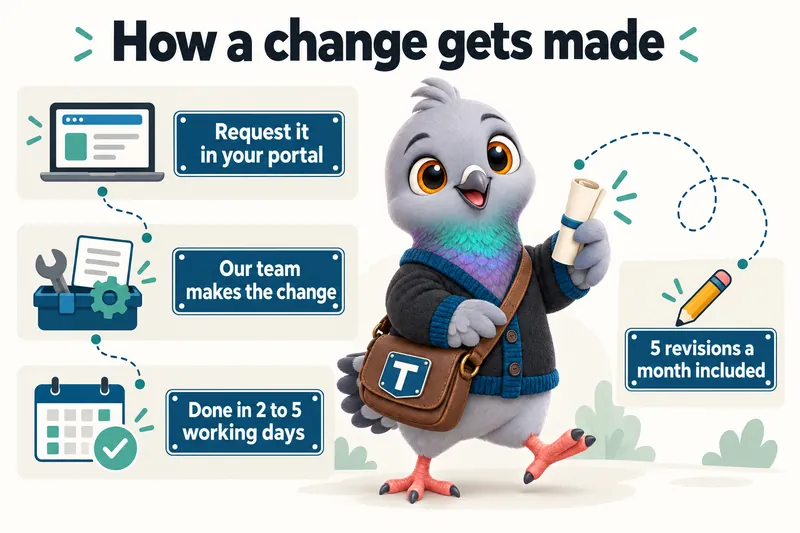
You get a client portal the day your site goes live. A revision, a new listing you want added, a new area page, an updated headshot, is requested there and completed within 2 to 5 working days. 5 revisions a month are included at every tier, with no limit on how large a single revision can be, and extra revisions beyond that are a flat $20 each rather than an hourly rate.
You never log in to the website itself
The portal is where you request work, raise a support ticket and send us files. We handle the website side directly, so nothing about running your site depends on you learning a page builder between showings. A message to our team gets a reply from a person within one working day.
- What it solves
- Every change to your site means a request to someone who gets to it eventually.
- What you do
- Describe the change in the portal. That is the whole job.
- Included on
- Every plan
Plan by plan
Every feature, and the plan that carries it
Grouped the way the work is grouped: the website, catching every lead, being found, content that keeps publishing, run for you.
| Feature | The Listing$137/ month | The Territory$297/ month + usage | The Portfolio$747/ month |
|---|---|---|---|
| The website | |||
| Pages built for an instant openA buyer taps your listing link at a red light and leaves before the photos load. | Included on The Listing | Included on The Territory | Included on The Portfolio |
| Listing pages that read like a real estate site, not a templateYour listings live only on a portal or brokerage system and vanish from your own site once they close. | Included on The Listing | Included on The Territory | Included on The Portfolio |
| The legal and compliance pages a real estate site needsA DIY site launches with no privacy policy, a cookie banner that blocks nothing, and no brokerage disclosure. | Included on The Listing | Included on The Territory | Included on The Portfolio |
| Catching every lead | |||
| Inquiries routed straight into your CRMShowing requests sit in an inbox nobody checks between appointments. | Included on The Listing | Included on The Territory | Included on The Portfolio |
| The AI Engine: chat on your siteA buyer with a quick question at 9pm gets no answer and moves on to the next agent. | Not on The Listing | Included on The Territory | Included on The Portfolio |
| An AI receptionist for the calls you cannot takeYour phone rings during a showing or a closing, and the caller rings the next agent on the list. | Not on The Listing | Included on The Territory | Included on The Portfolio |
| AI replies on SMS, Facebook Messenger and Instagram DMsA message about a listing sits unanswered for hours on Instagram, and the lead goes cold. | Not on The Listing | Included on The Territory | Included on The Portfolio |
| Being found | |||
| A site structured around the areas you serveA search for the towns you farm finds a national portal, not you. | Included on The Listing | Included on The Territory | Included on The Portfolio |
| A managed Google Business ProfileYour Google Business Profile still shows an old brokerage, an old photo and no recent posts. | Not on The Listing | Not on The Territory | Included on The Portfolio |
| SEO, answer engines and AI assistants, built into every pagePeople ask Google, voice assistants and AI chat about agents in your town, and your site gives them nothing clean to quote. | Included on The Listing | Included on The Territory | Included on The Portfolio |
| Content that keeps publishing | |||
| Researched articles, published every weekYour blog has not been touched since the site launched, and there is no time to write. | Included on The Listing | Included on The Territory | Included on The Portfolio |
| The Content EngineYou know you should post every week, and every week the listings win. | Not on The Listing | Not on The Territory | Included on The Portfolio |
| Run for you | |||
| Hosting, security and speed, managedA separate hosting bill, an SSL certificate that lapses, and a site that falls over when a listing goes viral. | Included on The Listing | Included on The Territory | Included on The Portfolio |
| A move from your current site that keeps what it earnedSwitching sites means broken links in old posts and lost rankings for the pages that worked. | Included on The Listing | Included on The Territory | Included on The Portfolio |
| Revisions and a portal built for how you actually workEvery change to your site means a request to someone who gets to it eventually. | Included on The Listing | Included on The Territory | Included on The Portfolio |
| The terms | |||
| Researched articles a week | 2 | 2 | 3 |
| Live in | 7 days | 10 days | 15 days |
| Revisions a month | 5 | 5 | 5 |
| One-time build fee, after launch | $797 | $797 | $797 |
AI usage on The Territory and The Portfolio is billed at what our provider charges us, with no markup. SMS carrier fees are passed through at cost. Every feature, explained
What these features look like in practice
“They built the FAQ from our actual buyer area inquiries correspondence. Each answer was reviewed by our own staff, so the page sounds like us rather than a copywriter. The phone calls about basic buyer area inquiries details have noticeably thinned out.”
“The preparation page for buyer area inquiries works because it keeps its focus. Visitors arrive knowing what the first discussion covers and what they should think about beforehand. First conversations are shorter and better because of it.”
From onboarding to a maintained site
Your listings and areas
Onboarding captures your listings, the areas you serve and where inquiries should land.
The site is built
Listing pages, area pages and the standard pages every site needs, custom coded and checked on a phone.
It launches, fast
90+ PageSpeed on every page, live in 7 to 15 days depending on plan.
It stays current
Revisions, weekly articles on every plan, and hosting all run through the plan afterward.
Questions on AI, articles, speed and search
What does the AI Engine actually do on my site?
On The Territory and The Portfolio, a trained agent answers common visitor questions, a listing's specifics, the areas you serve, or how to book a showing, and hands off to a real showing request the moment someone is ready to move forward. It is configured never to give valuation, investment or legal advice, and to route anything that sounds like advice straight to you.
Is the AI Engine included in the monthly fee?
The seat is included in $297/ month + usage. Usage is billed separately at what our provider charges us, with no markup, and shown as its own line so you can see exactly what it costs to run each month.
What does the AI receptionist do when I miss a call?
On The Territory and The Portfolio, it answers the call in your business's name, answers common questions about your listings and areas, takes the caller's details and books a showing or call back into your calendar. You get a summary and transcript of every call. It does not give pricing, valuation, financing or contract advice; anything like that is handed to you.
Can the AI answer text messages, Facebook Messenger and Instagram DMs?
Yes, on The Territory and The Portfolio. The same trained agent that runs your site chat replies to texts and social messages, qualifies the person and books an appointment, then hands the conversation to you. Business texting in the US needs A2P 10DLC carrier registration, which we file for you; carrier fees are passed through at cost.
What do the researched articles actually cover?
General, sourced content relevant to your areas and your buyers: buying-process explainers, area guides written in factual terms, and financing basics, each 2,500 to 3,200 words and cited from reputable sources. The Listing and The Territory publish 2 a week; The Portfolio publishes 3. Articles are general information, never advice about a specific property or transaction.
Can I review an article before it goes live?
Yes. Draft articles are available in your client portal before publishing, and you can request a change like any other revision. Most clients let the schedule run and review after the fact once they see the pattern of topics.
Do you post on social media and manage my Google Business Profile?
On The Portfolio, yes. The Content Engine adds 3 social posts and 2 short video reels a week, cut from your listings, area pages and articles, and keeps your Google Business Profile current with correct details, photos and regular posts. You stay the owner of every account.
Does a faster website really lower what I pay for ads?
It can help, and it certainly wastes fewer of the clicks you pay for. Google says landing page experience is one of the factors it considers when judging ad quality, and that higher-quality ads can often lead to lower costs per click. A page that loads fast also keeps more visitors from leaving before they see it. We hold every page at 90+ on Google PageSpeed, but we do not promise a specific cost change, because bids, keywords and competition matter too.
Will my site show up in ChatGPT, Perplexity or Google AI Overviews?
Nobody can guarantee that, and anyone who does is overselling. What we do makes it more likely: every site ships an llms.txt file, consistent business details on every page, answer-first copy, visible FAQs and structured data, so an AI assistant has clean, attributable facts about you to quote.
What is the difference between SEO, AEO and GEO?
SEO is being found and ranked in search results. AEO, answer engine optimization, is being the answer a search engine or voice assistant lifts into a featured snippet or spoken reply. GEO, generative engine optimization, is being cited by AI assistants such as ChatGPT, Claude and Perplexity. Your site is built for all three: area pages and technical SEO, answer-first copy with FAQs, and an llms.txt file with clean entity data.
How long before my site ranks in my area?
Our terms guarantee your site starts ranking for local searches in your area within 3 to 5 months of launch. If it has not, we continue the search work at no additional charge until it does. The guarantee covers your own area and services, not terms outside them, and not changes made by you or third parties.
See every feature built for your areas.
A live walk-through, on your screen, in about 30 minutes. Plans from $137 a month.
Book a demo